

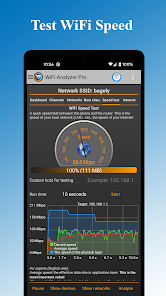
WiFi Analyzer Pro is a powerful Android tool designed to optimize your wireless network by identifying the best WiFi channel and location for your router. It provides detailed information about all nearby WiFi networks and connected devices, helping you reduce interference and improve connection speed and stability. The application supports both 2.4 GHz and 5 GHz bands, allows you to monitor signal strength in real time, and allows you to scan multiple networks without ads. With features such as custom device lists and sending logs to your Internet service provider, WiFi Analyzer Pro is suitable for both home users and professionals looking to improve network performance in an effective and intuitive way.
FEATURES OF WIFI ANALYZER PRO APK
COMPREHENSIVE ACCESS POINT DETECTION
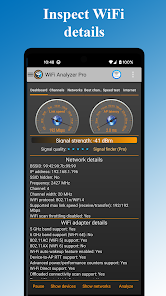
WiFi Analyzer Pro is excellent at identifying all nearby WiFi access points and gives users a clear overview of their wireless environment. It displays important information such as SSID, BSSID (MAC address), frequency band (2.4 GHz, 5 GHz or 6 GHz if supported), channel width, and security protocol (WEP, WPA, WPA2). This feature allows users to see all competing networks around them, which is essential for diagnosing interference and optimizing their network settings. By knowing the exact location and configuration of neighboring access points, users can make informed decisions to improve WiFi performance.
CHANNEL GRAPH AND SIGNAL STRENGTH VISUALIZATION
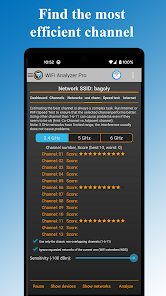
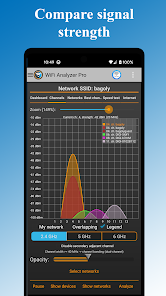
The application offers dynamic graphical visualization of WiFi channels and signal strength over time. Users can see how busy each channel is and monitor signal strength fluctuations, which helps identify sources of interference or weak spots in the coverage area. This feature is essential for selecting the best channel to minimize congestion and maximize throughput. Continuous monitoring of signal strength helps you find the optimal location for your router or devices to ensure a stable and fast connection.
ADVANCED CHANNEL ASSESSMENT AND RECOMMENDATIONS
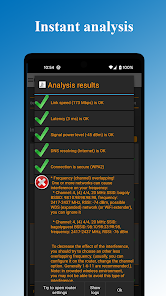
WiFi Analyzer Pro analyzes all detected WiFi networks and rates channels based on current usage and interference levels. It helps users avoid congested frequencies and recommends the best channels that can reduce performance. This automated channel assessment simplifies the complex task of managing WiFi channels, especially in dense environments such as apartment buildings and offices where multiple networks overlap. The app’s recommendations can significantly reduce dropped connections and improve overall network speed and reliability.
MULTIPLE WIFI BANDS AND TECHNOLOGY SUPPORT
This app supports a wide range of WiFi bands, including 2.4 GHz, 5 GHz, and 6 GHz (WiFi 6E), when supported by your hardware. It also detects HT (High Throughput) and VHT (Very High Throughput) capabilities, which correspond to channel bandwidths of 40, 80, and even 160 MHz. This ensures compatibility with modern routers and devices, allowing users to take advantage of the latest WiFi standards to increase speed and reduce latency. This multi-band support is essential for future-proofing network analysis and optimization.
NETWORK AND DEVICE DETAILS
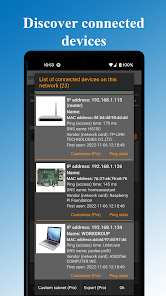
In addition to basic network scanning, WiFi Analyzer Pro provides detailed information about your network and connected devices. It displays access point manufacturer information, DHCP details, signal latency (ping), and security status. Users can also view a list of all devices connected to WiFi, which can help detect unauthorized users or troubleshoot device-related issues. In addition, the application allows you to directly open the router settings and quickly access configuration changes. This comprehensive insight allows users to maintain a secure and efficient network.