Primal TV Launcher offers a clean, customizable home screen for Android TV users, making it easy to quickly launch your favorite apps. It is fully customizable, supports multiple user profiles, and has the ability to display “Watch Next” items from compatible apps. Users can watch movie trailers directly on the home screen, set wallpapers that change automatically every day, or change their own background. The launcher supports widget integration from various sources and tile designs. Security is enhanced with an admin PIN to protect profiles, apps, and settings. Best of all, Primal TV Launcher is free of ads and in-app purchases, creating a distraction-free, seamless experience. It uses accessibility services to help users open the launcher with a dedicated button without collecting or sharing personal information, compromising user privacy, or compromising user experience.
FEATURES OF PRIMAL TV LAUNCHER APK
FULLY CUSTOMIZABLE LAYOUT
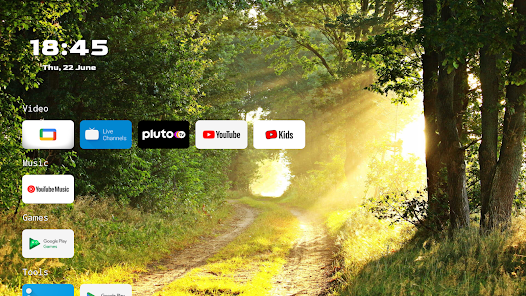
Primal TV Launcher offers an exceptional level of customization for your TV’s home screen layout. Unlike standard launchers that restrict you to a fixed grid or a limited app layout, this launcher lets you design your home screen exactly how you want it. You can freely move and resize apps, widgets, and tiles, and arrange them to prioritize your most-used apps. This flexibility means users can create a minimalist interface or a rich dashboard filled with shortcuts, depending on their preferences. The built-in layout editor is intuitive and drag-and-drop. This feature improves the user experience by making navigation faster and more intuitive, especially on large TV screens where quick access to content is essential. It allows users to customize the interface to their viewing habits, making the launcher truly personal and efficient.
WATCH UP NEXT AND MOVIE TRAILERS ON THE HOME SCREEN
A unique and powerful feature of Primal TV Launcher is the ability to display “Watch Next” items from compatible streaming apps directly on the home screen. This integration means you don’t have to open a separate app to continue watching your favorite shows and movies; the launcher delivers these recommendations right to your fingertips. This continuity saves time and simplifies viewing. In addition, the launcher supports the display of movie trailers directly on the home screen, adding an attractive and dynamic visual. This feature turns your TV interface into a mini entertainment center, where you can preview upcoming content without additional navigation. This is especially useful for users who like to stay informed about new releases or want to quickly access trending media.
AUTOMATIC DAILY WALLPAPER CHANGE, CUSTOM WALLPAPER SUPPORT
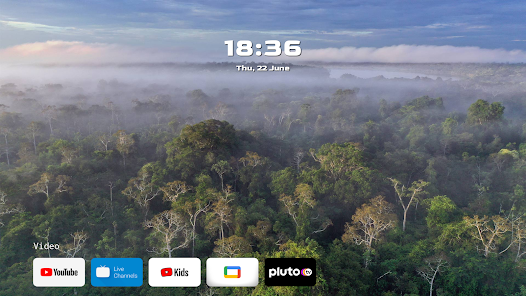
Appearance is the key aspect of any TV launcher, and Primal TV Launcher supports automatic daily wallpaper change and custom wallpaper. The launcher automatically updates the background image every day, keeping your home screen fresh and attractive with high-quality images, including stunning images in 4K and 8K resolution. For users who prefer a personal style, it allows you to use personal images or downloaded images. This feature enhances the aesthetic feel of your TV interface and allows you to create an atmosphere that suits your mood and style. The combination of daily high-resolution wallpapers and personalization options makes the launcher stand out from the rest in terms of visual design.
MULTIPLE USER PROFILES WITH ADMIN PIN PROTECTION
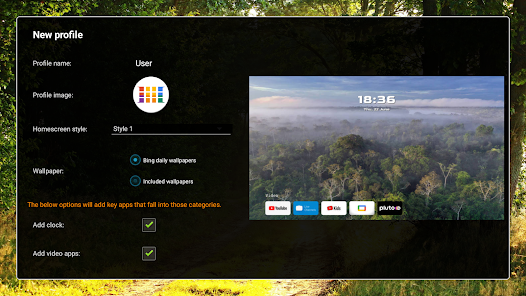
Primal TV Launcher supports the creation of multiple user profiles, which is a valuable feature for households where several people share a single TV device. Each profile can have its own settings, applications, and settings, allowing family members to enjoy a personalized experience without interfering with each other’s choices. For enhanced security and privacy, the launcher includes an admin PIN feature that allows you to lock profiles, applications, and settings options. This way, children and other users cannot access restricted content or change important settings without permission. The PIN code adds a layer of control and peace of mind, making the launcher ideal for family environments where content management and user separation are important.
TILE DESIGN AND WIDGET SUPPORT
Another key feature of Primal TV Launcher is its support for tile designs from multiple sources, integrating widgets onto the home screen. Tiles are clickable elements that represent apps, shortcuts, or content feeds, and the ability to customize their appearance and source gives users extensive control over their interface. You can create a personalized dashboard that fits your entertainment needs, and design tiles to highlight specific apps, streaming channels, and even web content. Widget support allows you to add functional elements such as the time, weather, news, and sports scores directly to the home screen. This integration transforms your TV launcher from a simple app launcher into a dynamic information hub, improving usability and aesthetics.