




Wifi Analyzer Pro is a powerful network tool designed to help users analyze, optimize, and improve their WiFi connections. It provides detailed information about nearby wireless networks, including signal strength, channel usage, and interference levels. With this information, users can easily find the best channel for their router and improve overall internet speed and stability. The app supports both 2.4GHz and 5GHz bands, offering a clean, ad-free experience. Whether you’re troubleshooting slow internet or optimizing your home network, Wifi Analyzer Pro gives you the tools to create faster, more reliable connections.
REAL-TIME WIFI CHANNELS AND SIGNAL ANALYSIS
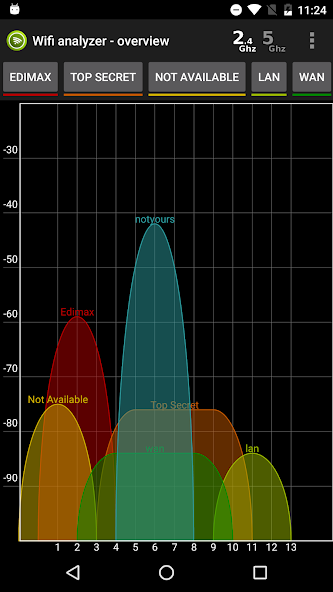
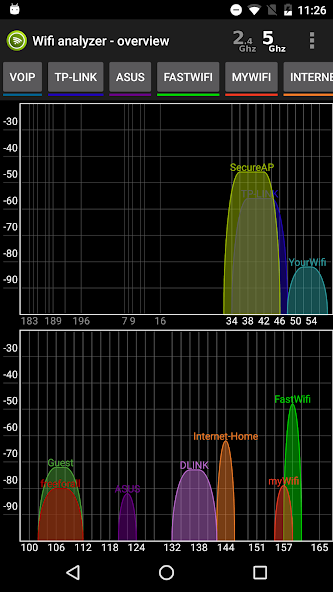
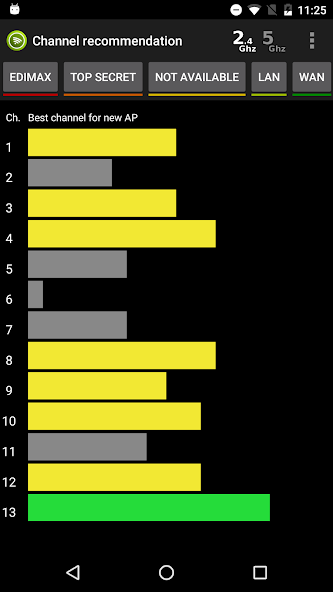
Wifi Analyzer Pro helps users understand their network environment by providing real-time information about nearby WiFi signals. It displays channel distribution, signal strength graphs, and interference levels, allowing users to identify congested channels. The app then suggests the best channels to switch to for improved performance. This is especially useful in areas with multiple networks, such as your home or office, where interference can slow down your connection.
- It shows nearby WiFi networks with detailed signal strength information.
- It shows you a channel graph to help you identify interference and congestion.
- It suggests the best channel for a faster and more stable connection.
NETWORK SELECTION AND ROUTER LOCATION TOOLS
This app includes features that help users improve their WiFi setup beyond channel selection. It helps you find the best physical location for your router by analyzing signal strength in different areas. This helps eliminate dead zones and ensures better coverage throughout your home or office. In addition, it provides channel width information and advanced network data for more accurate optimization.
- It helps you determine the best location for your router to create stronger coverage.
- It provides detailed channel width information (20/40/80 MHz) for advanced settings.
- It improves network performance by reducing weak signal areas.
LIGHTWEIGHT, AD-FREE EXPERIENCE WITH EXPORT FEATURE
Wifi Analyzer Pro offers a clean, ad-free interface that is perfect for centralized network analysis. It also allows users to export scan results as screenshots or CSV files for further analysis or sharing. The app is lightweight and efficient, ensuring smooth operation even during continuous scanning. However, due to Android system limitations, some scanning features may be limited on newer versions of the operating system.
- It provides an ad-free experience for continuous use.
- It supports exporting data as screenshots or CSV files.
- It works smoothly with a lightweight and efficient design.