
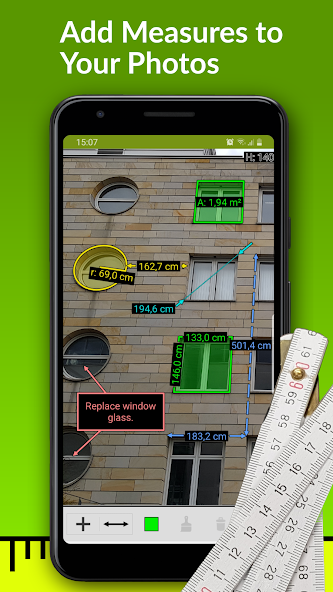


ImageMeter – PhotoMeter is a powerful Android app that allows you to measure and annotate distances, areas, angles, and object dimensions directly on images. Instead of rough sketches or hand-drawn notes, you can take photos of spaces, walls, furniture, or designs and annotate them with precise measurement data and text notes on the image. The app supports advanced features such as Bluetooth connectivity with a laser distance meter, exporting annotated images to PDF or image formats, and support for multiple metric and imperial units. Ideal for professionals, architects, DIY enthusiasts, and anyone who needs to take precise measurements from images, ImageMeter makes documenting and sharing measurement results easy and efficient.
BASIC MEASUREMENT AND ADJUSTMENT ON IMAGES
The main advantage of ImageMeter lies in its image-based measurement system, which allows users to annotate images with precise dimensional data long after the image was taken. After you take a photo of an object, room, or surface you want to measure, the app lets you make adjustments using known reference dimensions, then automatically calculates lengths, angles, circles, and even complex shapes – all displayed directly on the image. This feature eliminates the need for manual drawing and makes it easy to measure hard-to-reach objects. Whether you’re documenting a construction project, planning a renovation, or marking up details on a finished model, ImageMeter ensures the accuracy and clarity of your recorded images.
- Align the image with a reference object and measure dimensions long after the image is taken.
- Directly record lengths, angles, and areas on the image without having to draw manually.
- Supports measuring simple and complex shapes using intelligent correction.
EXPORT, ORGANIZE AND EXPORT ADVANCED DATA
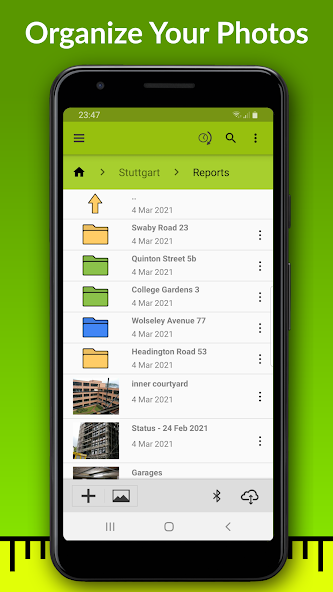
ImageMeter doesn’t stop at simple measurements – it also offers powerful export and organization features to help you manage and share your tagged measurement files. You can export tagged images as PDF, JPEG or PNG files for reports, presentations or client documentation. Entire folders of measured images can be exported as ZIP archives, and images can be categorized into color-coded, customizable subfolders to improve project organization. These tools make it easy to track multiple projects, share measurement results with colleagues or clients, and archive important visual measurement data for future reference.
- Export individual measured images to PDF, JPEG or PNG.
- Organize your tagged images into color-coded, labeled subfolders.
- Export entire image folders as a ZIP archive for backup and sharing.
BLUETOOTH LASER AND MULTI-UNIT MEASUREMENT SUPPORT
For users who require high accuracy in real-world measurement tasks, ImageMeter has extensive integration with Bluetooth-enabled laser rangefinders from top manufacturers such as Leica, Bosch, and Hilti. This allows you to take precise distances and angles using the hardware and enter these measurements directly into your drawing notes. The app also supports metric and imperial units, including fractional inches, making it flexible for different regional standards and professional requirements. Combining hardware measurement tools with drawing notes creates an efficient and accurate workflow for construction, architecture, interior design, and landscape professionals.
- Works with multiple Bluetooth laser rangefinders to integrate real-world measurements.
- Supports both metric and imperial units for easy use worldwide.
- Measured values are automatically synced from your Bluetooth device to your drawing notes.