
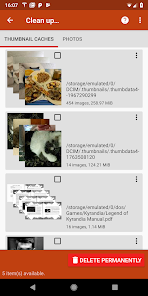


DiskDigger Pro is a powerful Android application designed to recover deleted photos, videos, documents, music and more from your device’s internal memory or memory card. It supports JPG, PNG, MP4, MP3, DOCX, PDF, ZIP and many other file types. For full recovery capabilities, the device must be rooted; otherwise, the application can only scan limited photos and videos from low-resolution cache folders. After scanning, users can use the “Clean” function to recover files or permanently delete unwanted items. Recovered files can be saved locally or directly uploaded to cloud services such as Google Drive and Dropbox. DiskDigger Pro is a reliable tool for recovering lost data, even if the memory card has been accidentally deleted or reformatted.
FEATURES OF DISKDIGGER PRO APK
EXTENSIVE FILE RECOVERY SUPPORT
DiskDigger Pro supports a wide range of file types, making it a versatile tool for various data loss scenarios. It can recover images (JPG, PNG, HEIF, GIF), videos (MP4, 3GP, MOV), audio files (MP3, M4A, AMR, WAV, OGG), documents (DOC, DOCX, PDF, XLS, PPT, ODT and more), archives (ZIP, RAR), APK files, and even raw camera files. It can recover important files that have been accidentally deleted or lost due to formatting.
ABILITY TO FULLY SCAN ROOTED DEVICES
For optimal performance, DiskDigger Pro requires root access on Android devices. With root access, the program can fully scan the device’s internal memory and delve deep into raw partitions to find inaccessible files. This deep scanning capability greatly increases the chances of recovering files that may have been lost by other programs, including files lost after formatting or mass deletion. Without root, the program is limited to scanning cache and surface folders, and only recovers low-resolution versions of photos and videos.
SIMPLE AND FLEXIBLE RECOVERY PROCESS
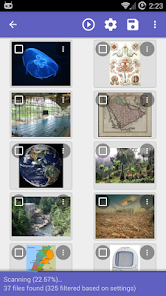
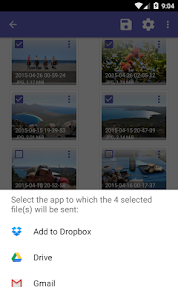
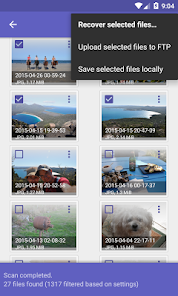
DiskDigger Pro offers two scan modes: Basic and Full. Basic scan is faster and targets accessible storage areas, while Full scan is more accurate but requires root access. After scanning, users can preview recoverable files in a grid format, making it easier to identify and select the files they want to recover. The program offers filtering options by file type and size, simplifying the recovery process. If desired, files can be saved locally or directly uploaded to cloud services such as Google Drive and Dropbox, or sent via email, providing flexible file management options after recovery.
FREE SPACE CLEANING AND WIPING FUNCTION
In addition to recovering deleted files, DiskDigger Pro also includes experimental management features. The “Clean” button allows users to permanently delete unnecessary files, freeing up storage space and reducing clutter. Additionally, the “Wipe Free Space” option securely erases the free space on your device, making deleted files unrecoverable by any recovery tool. These features are useful for users who want to maintain privacy or optimize storage space after recovering important files.
FTP AND CLOUD STORAGE UPLOAD SUPPORT
The program allows you to upload recovered files directly to various locations. Users can save recovered data not only to local folders, but also to Google Drive, Dropbox, or FTP servers. This integration allows you to easily backup and share recovered files without having to manually move them, which is especially useful when recovering large amounts of data or managing files on multiple devices.
REGULAR UPDATES AND DEVELOPER SUPPORT
DiskDigger Pro is actively maintained by Defiant Technologies LLC, and has regular updates that improve compatibility with new versions of Android and fix bugs. The developer provides detailed instructions and support through its official website, helping users to maximize the effectiveness of the program. This ongoing support ensures that DiskDigger Pro remains a reliable and up-to-date data recovery tool for Android devices.