

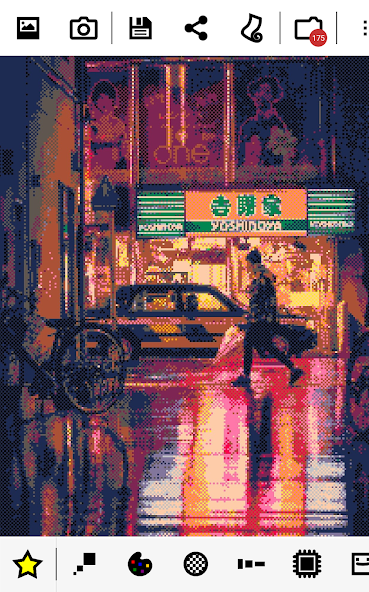
8Bit Photo Lab is a creative photo editing app for Android that transforms ordinary photos into retro-style 8-bit pixel art inspired by classic computers and game consoles like Game Boy, NES, Apple II, and ZX Spectrum. With over 50 color palettes, 15 dithering effects, and a wide collection of customizable pixel resolutions, you can easily transform your photos into memorable pixel masterpieces. The app also lets you personalize your creations and add 8-bit text, glitch effects, and fun stickers to create memes, posters, or digital art. With instant previews, one-click saving and sharing, and support for high-quality PNG output up to 4096×4096, 8Bit Photo Lab offers Android users both simplicity and powerful retro art.
REAL 8-BIT PHOTO CONVERSION AND RETRO FILTERS
8Bit Photo Lab specializes in transforming photos into authentic 8-bit pixel art, giving your photos the classic look of vintage computer and video game graphics. The app offers a variety of predefined palettes inspired by vintage platforms such as GameBoy, NES, Commodore 64, Apple II, ZX Spectrum, etc., so users can easily apply nostalgic color schemes right away. You can also change palettes, adjust pixel density, color blending, and dithering techniques to fine-tune your artwork and make it truly unique. With 15 different dithering options, including error diffusion, checkerboard, and noise, you have the tools to simulate authentic pixel textures that mimic the aesthetics of retro games and early digital art. Whether you’re creating pixel art for fun, designing themed posters, or creating unique memes, this feature gives you unlimited creative freedom and a true retro feel.
- This app offers over 50 retro color palettes taken from classic gaming systems, bringing a vintage aesthetic directly to your images.
- You can change the palette, adjust pixel density and color interpolation, and customize pixel art effects.
- Multiple dithering methods let you emulate old-school graphics styles and control pixel texture and detail.
FUN GRAPHICS TOOLS AND ARTISTIC CUSTOMIZATION
8Bit Photo Lab goes beyond simple filters by offering a variety of decorative tools to help you personalize and enhance your pixel art with an artistic touch. You can add 8-bit text, custom stickers, and glitch effects to add personality or humor to your artwork. The text tools include retro font and frame options, perfect for creating pixel captions, speech bubbles, or meme-style overlays. Glitch effects like screen melting, pixel scattering, and RGB offset give your photos a digital distortion style reminiscent of classic computer glitches and demo footage. These art tools expand your creative possibilities, making the app useful for both casual users and digital artists who want to experiment with retro art concepts. With instant previews and real-time adjustment controls, you can experiment freely and create vibrant pixel art that will stand out on social media or personal projects.
- You can add retro-style 8-bit text and themed stickers to add personality to your images.
- Glitch effects like pixel scattering and RGB distortion add dynamic visual twists to your images.
- Real-time previews let you see changes instantly, so you can iterate quickly and creatively.
HIGH-QUALITY EXPORT AND CREATIVE OUTPUT OPTIONS
8Bit Photo Lab ensures that your pixel art creations are not only fun, but also colorful and shareable with robust export and quality options. After editing, you can save your images directly in high-resolution PNG format, and the output can reach up to 4096×4096 pixels, making it perfect for social media posts, wallpapers, prints, or digital portfolios. The app’s intuitive one-click save and share feature makes it easy to upload your creations to networks like Instagram, Facebook, or Twitter. Additional mesh layer support helps bead artists, cross stitch designers, and pixel crafters plan physical projects based on your creations. Whether you’re creating digital art for online communities or designing real-world craft patterns, the high-quality output and wide resolution range offer flexibility and professionalism in your creative process.
- Export images in high-resolution PNG format up to 4096×4096 pixels for detailed artwork.
- One-click save and share tools make it easy to post creations to social networks.
- Additional mesh layers help you plan your pixel art-based beadwork, cross-stitch, and other crafts.